5 Graphs: relationships
Connection to the curriculum: This is the fifth in a series of statistical articles for mathematics teachers. In this article, we discuss graphs for exploring relationships, referred to in
- General Mathematics
- Unit 2, Topic 1 (Univariate data analysis and the statistical investigation process),
- Unit 3, Topic 1 (Bivariate data analysis),
- Unit 4, Topic 1 (Time series analysis), and
- Essential Mathematics
- Unit 2, Topic 1 (Representing and comparing data),
- Unit 3, Topic 3 (Graphs), and
- Unit 3, Topic 4 (Data Collection).
5.1 Introduction
The third step in the statistical investigation process given in the curriculum is analysis (Dunn and Marshman, 2020a) for which graphs can be used informally. In Dunn and Marshman (2020c), we discussed graphs for understanding univariate data. However, exploring relationships between variables is often more interesting.
The main purpose of a graph is to help readers understand the data, and consequently answer the research question. Constructing the graph is just the mechanism, while the goal is understanding and describing the relationship. As stated in Dunn and Marshman (2020c):
… the main focus of teaching graphs in class should be understanding what the graphs reveal about the data, rather than the construction of the graphs. As identified by Pfannkuch (2008), schools may emphasise making graphs (mathematical thinking), rather than interpreting these graphs (statistical thinking). Furthermore, the skill of making graphs has largely been deferred to computers, enabling large (and, potentially, more interesting) data sets to be used in schools.
Choosing the correct graph is important, and partly depends on the type of variables (Dunn and Marshman, 2020b). We focus on situations where the relationship between two variables is explored, but sometimes extend our discussion to consider more variables.
5.2 The relationship between one numerical and one categorical variable
The relationship between one numerical and one categorical variable can be displayed using back-to-back stemplots in special situations (see Dunn and Marshman, 2020c), but more generally by using parallel boxplots.
Back-to-back stemplots are effectively two stemplots sharing a common stem. Consequently, as with stemplots, these plots only work well in special situations (see Dunn and Marshman, 2020c): for small amounts of data; when the number of stems is small in comparison with the number of leaves; when not too many significant figures are needed. In addition, back-to-back stemplots can only be used to compare two groups. In contrast, parallel boxplots and dotplots can be used for any size data set and for comparing any number of groups, so are generally more useful.
As an example, consider comparing the age of Australian Prime Ministers and American Presidents on taking office: how do their ages compare? Are US Presidents and Australian Prime Ministers of a similar age on taking office? A back-to-back stemplot for the ages of the \(30\) Australian Prime Ministers and \(46\) US Presidents is shown in Figure 1. The common stems are in the middle of the plot (representing ages in the \(30\)s, \(40\)s, etc.); the ages of Prime Ministers extend to the left of the stems, while the ages of Presidents extend to the right of the stems. For example, the two youngest Australian Prime Ministers were \(37\) and \(39\); the youngest President was \(42\).
97| 3 | 8777654| 4 |236677899
998766665433322100| 5 |0111112244444555566677778
730| 6 |0111244589
| 7 |08
Figure 1: Back-to-back stemplot for the ages (in completed years) of Australian Prime Ministers (left) and American Presidents (right) upon taking office. 6 | 3 means 63 years of age.
From the plots, Australian Prime Ministers are slightly younger, in general, than US Presidents upon taking office. The youngest PM was \(37\) years (Watson) and the oldest \(67\) (McEwen); the youngest President was \(42\) (T. Roosevelt) and the oldest was \(78\) (Biden).
Another example comes from an advertising campaign conducted by the now-defunct Australian pizza company Eagle Boys. Among other claims, they stated that their pizzas were larger (on average) than Dominos pizzas. Many teaching activities (including asking many questions relating to the advertising campaign) relating to this data set can be found in Dunn (2012); here we examine if there is evidence to support Eagle Boys’ claim: Is it true that Eagle Boys pizzas have larger diameters than Dominos pizzas, on average?
The pizza diameters can be compared using a boxplot (or a “box-and-whisker” plot; Fig. 5.1). Figure 3 gives some details of how boxplots are constructed, using just the Dominos pizzas as an example:
- The line at the very top is located at the largest value in the data set.
- The next line locates the diameter for which 75% of the data are smaller. This is also called the third quartile, designated as Q3.
- The next line locates the diameter for which 50% of the data are smaller. This is also the median, or the second quartile, designated as Q2.
- The next line locates the diameter for which 25% of the data are smaller. This is also called the first quartile, designated as Q1.
- The line at the very bottom is located at the smallest value in the data set.
(Note that the values of Q1, Q2 and Q3 can have only approximately 25%, 50% and 75% of the data smaller than that value, unless sample size is divisible by four, two and four respectively. At least nine algorithms are available for computing quartiles in other situations (Hyndman and Fan, 1996)).
The centre “box” represents the central 50% of the data. The height of this box (that is, Q3 ‒ Q1) is also called the interquartile range and designated as IQR. The “whiskers” extend to show the range of the largest 25% and smallest 25% of the data. Effectively, a boxplot divides the data into four sections of approximately equal number of observations.
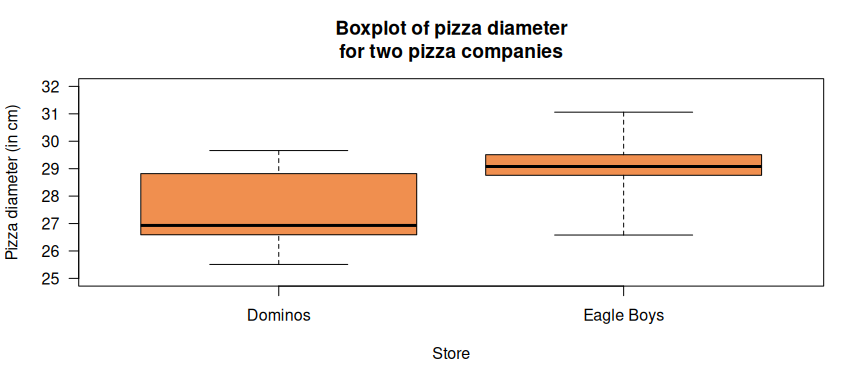
Figure 5.1: A parallel boxplot of the pizza diameters for 125 pizzas from each of the two companies.
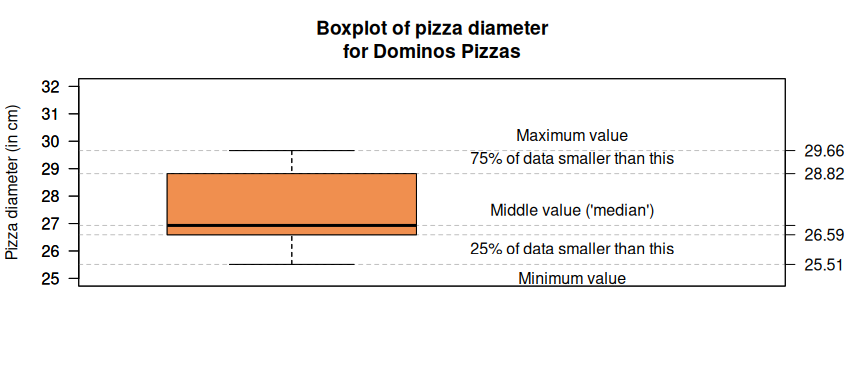
Figure 5.2: A boxplot of the pizza diameters for 125 Dominos pizzas, explaining the meaning of the five horizontal lines in the boxplot.
#> png
#>   2
Commonly, the whiskers do not necessarily extend to the extremes of the data. Instead, the software identifies “outliers” (unusual observations), and indicates these individually with points, then extends the whiskers to the largest and smallest observations not classified as outliers. The usual (but arbitrary) definition of an outlier (called the IQR rule) is
- An observation larger than Q3 + 1.5 × IQR
- An observation smaller than Q1 – 1.5 × IQR
The boxplot then would appear as shown in Fig. 5.3. That is, no outliers are observed using this rule for the Dominos pizzas, but two large and one small outliers are identified using this rule for the Eagle Boys pizzas.
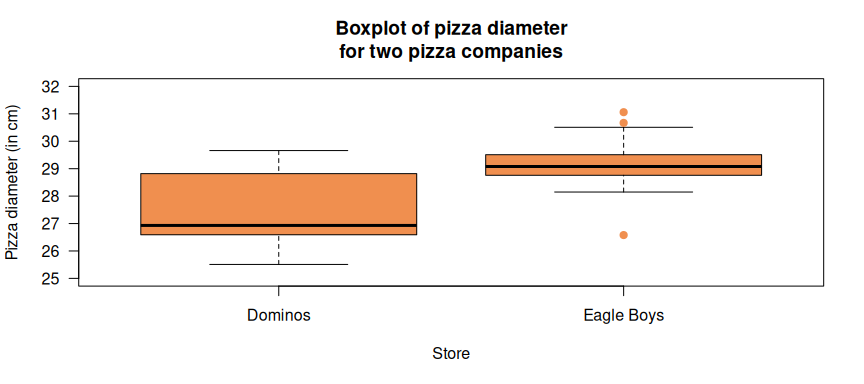
Figure 5.3: A parallel boxplot of the pizza diameters for 125 pizzas from each of the two companies, with outliers identified using the IQR rule.
A boxplot summarises the numerical data in each of the groups using five statistics (the maximum and minimum values, and the first, second and third quartiles), so much of the detail is lost. The advantage, however, is that two (or more) data sets can be compared on these crucial statistics. This is especially the case if the centre or the spread in the distribution is crucial (). From Figures 2 and 4, for example, we can see that the diameter of Eagle Boys’ pizzas are larger than Dominos pizzas on every one of these five statistics. In fact, the median pizza diameter for Eagle Boys pizzas is larger than the third quartile (i.e., than 75%) of pizza diameters for Dominos’ pizzas.
The boxplots also show that the diameters of Eagle Boys’ pizzas are more consistent; the variation in the diameters of the Dominos’ pizza is far greater: the middle 50% of observations, denoted by the height of the central box (the IQR), cover a far smaller range for Eagle Boys pizzas. However, the only identified outliers correspond to those from Eagle Boys. Students could be asked: “Does it matter that Eagle Boys has outliers? Could this affect our decision about which pizza to buy?”
If the data sets are not too large, more detail can be revealed using dotplots (Dunn and Marshman, 2020c), either as a stand-alone graph or overlaid on the boxplot (Figure 5). For the pizza data, the dotplot shows an unusual distribution for the Dominos pizzas’ diameters; are there perhaps two different “sub-groups”? Further examination, using another boxplot (Figure 6), suggests that these two groups are related to the type of pizza crust: thin crusts tend to have larger diameters than deep pan or mid crusts. Note that comparing three categories using a boxplot is just as simple as comparing two categories.
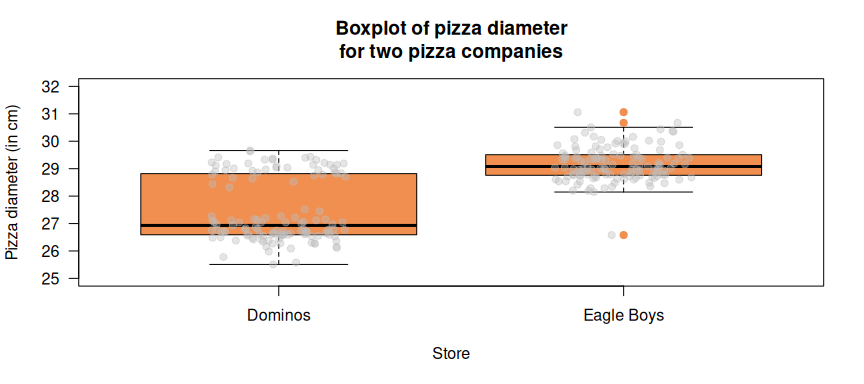
Figure 5.4: A parallel boxplot of the pizza diameters for 125 pizzas from two companies, with the individual observations overlaid using a dot plot. The information in orange is the boxplot; the information in grey is the dotplot.
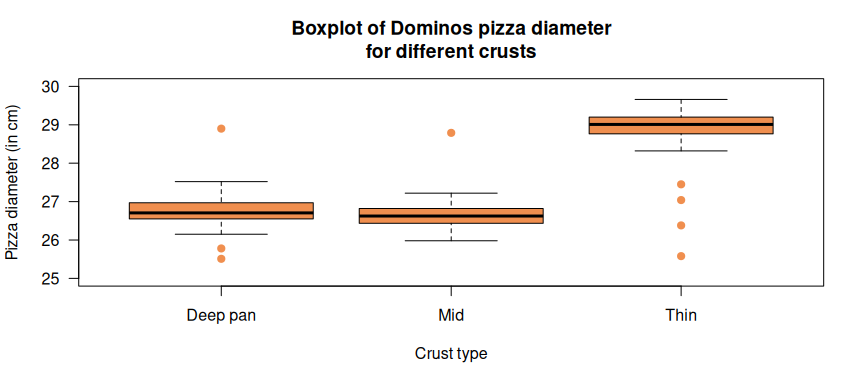
Figure 5.5: A parallel boxplot of the 125 Dominos pizza diameters for the three crust types.
It is important to consider the context when deciding whether the analysis focus on the centre, the spread, or on the edges of the distribution. With our pizza sizes, we want to focus on the centre rather than the extreme values. The pizza manufacturers may focus on the spread, as they aim for a consistent production process. If we were considering driving safety and the braking distances of cars are being measured, then a make of car that occasionally has an outlier that does not brake in time is important and would be a focus with the data analysis.
5.3 The relationship between two numerical variables
The relationship between two numerical variables can be displayed using a scatterplot. Our example comes from data collected about property prices in Melbourne from 03 September 2016 to 24 February 2018 (scraped by Tony Pino from https://Domain.com.au, and available on Kaggle), and specifically, houses (not units, etc.) sold in Essendon. An initial graphical examination of the house prices using a histogram (Figure 7) shows an average price of about $1.5M, but huge variation in the prices. Of course, identifying features of houses that might contribute to this variation is not difficult: for example, does the year in which a house was built influence the sale price? Or is the size of the house block more influential than age on the sale price?
#>         Suburb
#> Postcode Essendon
#>     3040      409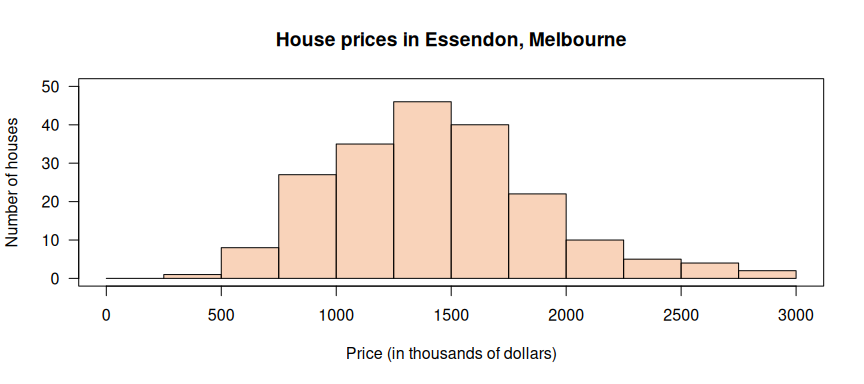
Figure 5.6: A histogram of the sale prices of houses in Essendon from September 2016 to 24 February 2018.
To answer these questions, which involve two numerical variables, we can use scatterplots. Each point on a scatterplot represents one house from which the values of two numerical variables have been obtained. Students often have difficulty interpreting scatterplots, focussing on whether there is a correlation in the data and not considering the horizontal and vertical values from the axes (Cobb, McClain & Gravemeijer, 2003).
The scatterplot of the sale price against the age of the house shown in Figure 8 also includes a regression line (or “linear trend line” as it is called in Excel). The regression line shows that for houses built later, the average house price (as shown by the regression line) drops very slightly; this is an example of a slightly negative linear relationship. Perhaps more evident is that the house prices vary substantially even for houses built in the same year.
Other variables influence house price also. For example, Figure 9 shows that the land area has a huge impact on the selling price. This is an example of a positive linear relationship. Even so, a large amount of variation still exists in house prices for houses built on similar size land. Not all relationships are linear relationships, though these two relationships are approximately linear.
Figure 9 has some unusual features. Some houses have a land area of zero square metres. Students can be asked to explain this apparent error (the data could be missing, and a zero substituted in the data set). This also demonstrates how graphs can be used to “clean” data (locate and then fix errors) before analysis. Students could also be asked if removing these zero (and near-zero) land sizes changes the message given by the graph.
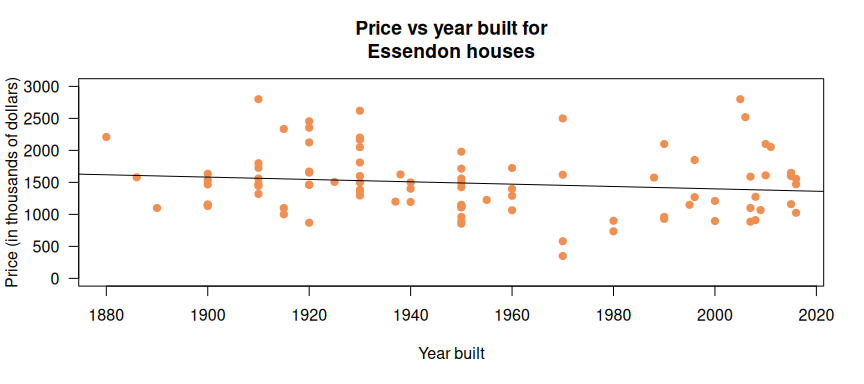
Figure 5.7: A scatterplot of price and year built for Essendon houses.
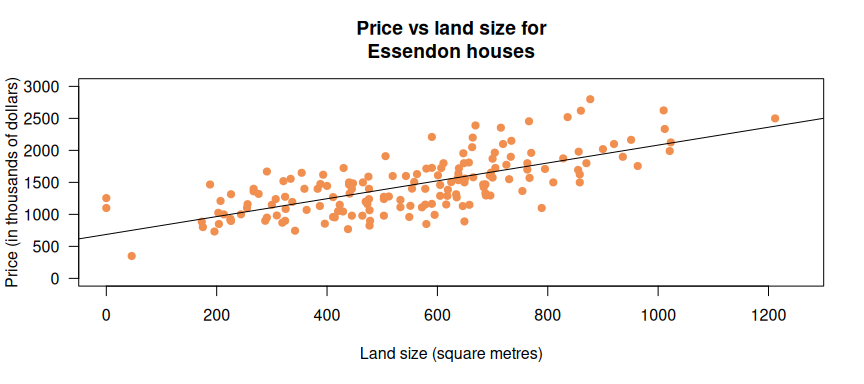
Figure 5.8: A scatterplot of price and land area for Essendon houses.
A third categorical variable can be included on a scatterplot, by using different plotting symbols and/or colours to distinguish the levels of the categorical variable. For instance, we could also add information about the number of bathrooms in the houses (Figure 10). Using categorical variables with more than two levels can make the scatterplot difficult to read. In Figure 10, most houses with 3 or 4 bathrooms seem to command a higher price than houses on similar land sizes, on average (as they are probably larger houses).
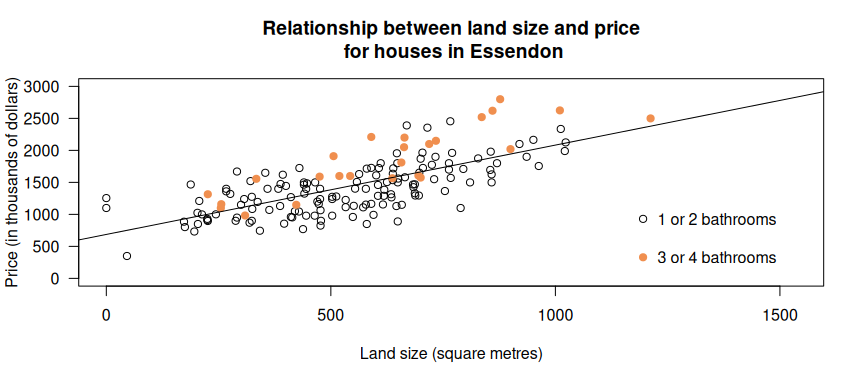
Figure 5.9: A scatterplot of price and land area for Essendon houses.
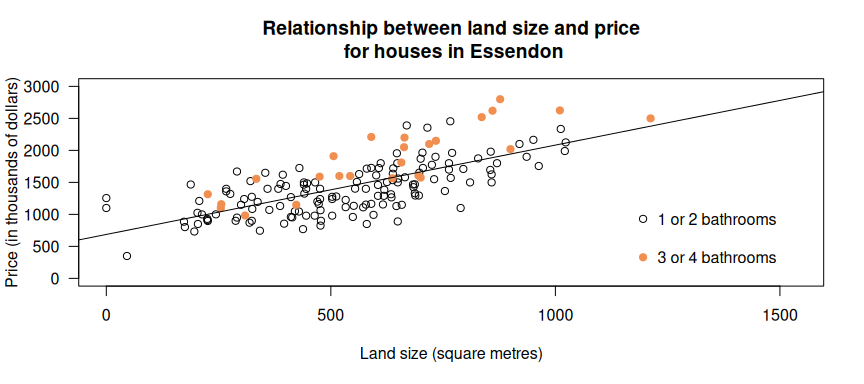
Figure 5.10: A scatterplot of price and land area for Essendon houses, separated by number of bathrooms.
5.4 Timeplots: Numerical variables plotted against time
When one of the numerical variables is time (that is, the other numerical variable is recorded in a time-sequential manner), the data are a time series and can be plotted using a time series plot. Time series can be regular (evenly spaced, such as monthly) or irregular (not evenly spaced). The non-time numerical value can be discrete or continuous. Interesting time series are available in many areas of applications, allowing opportunities to connect with other school subjects. Examples include sales of products, climatic variables, financial data, and demographic data measured over time.
One small example of a time series plot shows the sales of electric cars in Australia since 2011 (Schmidt, 2020; Figure 11). Since one numerical variable is measured sequentially over time, time series plots usually show the points joined by a line. This series is short, but shows a trend of increasing sales, but a drop in sales in 2020.
A class discussion of trends and unusual observations in graphs encourages students to think about the context of the graph and the message it provides. In this context, students can be asked: why did the sale of electric cars drop in 2020? In this case, possible reasons may include lockdowns due to Covid-19, potential errors in the data, or that the data in 2020 is incomplete for the year.
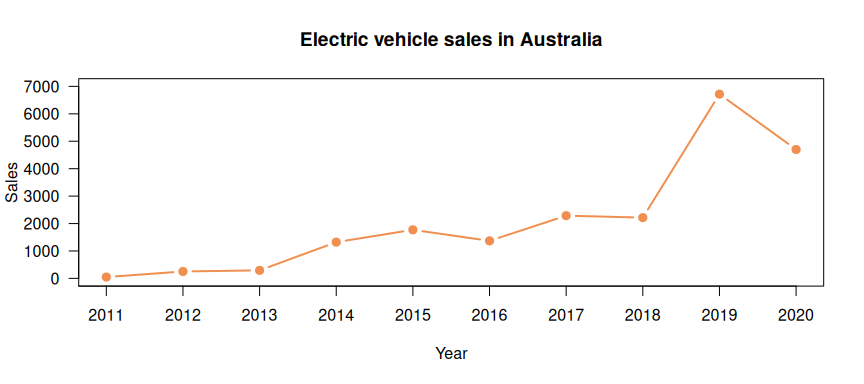
Figure 5.11: Electric cars sales in Australia.
Time series can be recorded at various time scales, from annual data (Figure 11) to per-second or even finer scales. Some data show seasonality, which refers to patterns related to calendar-based movements. For example, Figure 12 shows the monthly production of chocolate confectionery in Australia (Hyndman and Yang, 2018, from the Australian Bureau of Statistics). An overall trend of slightly increasing sales over the given time period is evident. However, the most prominent feature is the monthly fluctuations: a general pattern seems to repeat each 12 months. Figure 13 shows a plot of similar data but on a quarterly time scale, where the pattern now repeats each four quarters. Again, the general long-term trend seems to be an increase in chocolate production. Students can be asked to posit possible explanations for the regular fluctuations in chocolate sales.
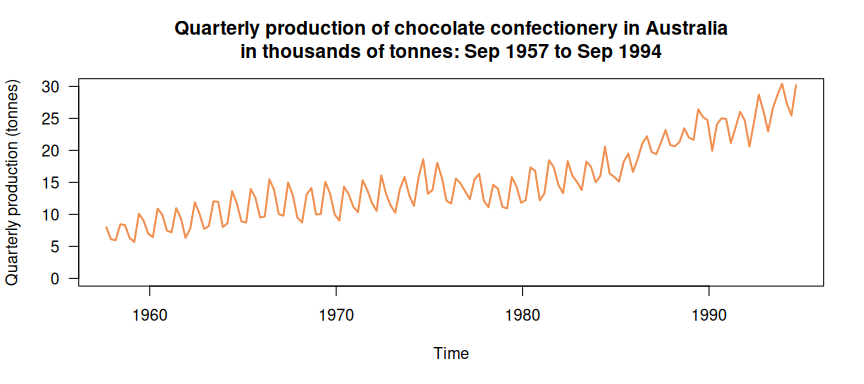
Figure 5.12: The quarterly production of chocolate confectionery in Australia.
As with all plots, the purpose is to learn something about the data and so the features of the plots should be described. Time series can typically be described with a trend (long term direction), seasonality (systematic, calendar-related movements), and irregular fluctuations (unsystematic, short-term fluctuations), and recognise when there are outliers or unusual observations (ACMGM088).
Not all time series show seasonal trends. However, they are still useful for encouraging students to consider questions about the context, and to look for potential reasons outside the statistics, as with the graphs of COVID-19 cases per month in Figure 14 (data from COVID-19 in Australia (Fair Facts Data, 2021)). If Figure 15 is used there is further opportunity to discuss variation in the data. Teachers will have to be mindful of the students in their class before discussing COVID-19 cases as for some cohorts this data may not be appropriate.
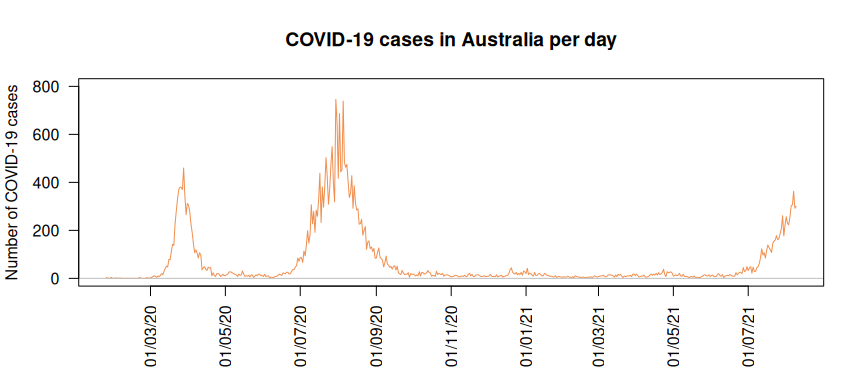
Figure 5.13: The number of COVID-19 cases reported in Australia each month since the first case (27 January 2020) until 09 August 2021.
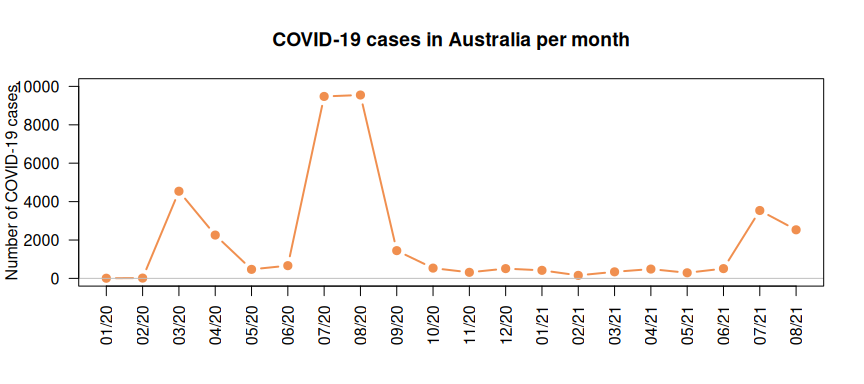
Figure 5.14: The number of COVID-19 cases reported in Australia each day since the first case (27 January 2020) until 09 August 2021.
5.5 Teaching ideas
Students can have misconceptions and difficulties identifying both the centre of data, as well as variability in the data, when it is presented graphically, including as a stemplot (Cooper and Shore, 2008). This can occur despite students being familiar with the median as the “middle” of the sample. Some students become confused with what the data values are, and consequently either report the mean and median as a single-digit leaf value near the median or alternately report a value from the leaf associated with the middle stem value. Students also did not always consider the context in their responses. By asking students, “What are the data?”, teachers can help redirect student thinking back to the data and to considering the reasonableness of their response, particularly when students may have
revert[ed] to using memorized algorithms, perhaps without correctly identifying the data and without regard to the reasonableness of their responses.
(Cooper and Shore, 2008)
Students often have difficulty interpreting boxplots and seeing the connections with prior knowledge (Edwards, Özgun-Koca & Barr, 2017; Watson, 2012), and difficulty interpreting the density of points. Edwards, Özgun-Koca and Barr (2017) believe that students interpret the boxplots using their prior knowledge of bar charts: the longer the central box the more data points are included, rather than 50% of the data is included within that central box. Alternatively, Watson (2012) described connections with length on the ruler where students interpreted the number of data points in each section as dependent on the length of the section rather than as 25% (approximately) of the data. Showing students graphs with a boxplot and dot plot on the same axis may help them understand the inverse relationship between length of line or bar and the number of data points (Figure 16). Students can be supported to develop their fluency with boxplots with tasks that encourage them to use the five-number summary that was used to create the boxplots (Edwards, Özgun-Koca & Barr, 2017; Watson, 2012). To further develop students understanding of the variation in data values with boxplots, a useful activity is to give students a boxplot and ask them to place, for example 24 sticky dots on the boxplot to represent possible data. The ensuing discussion would then explore the variety of possible distributions created by the different groups of students.
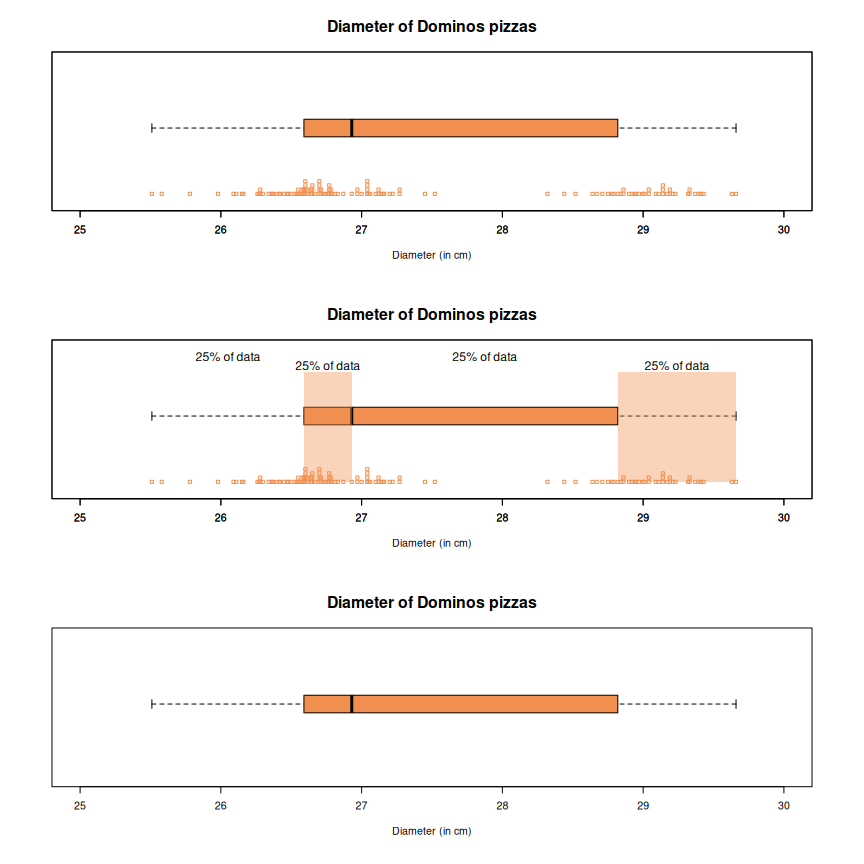
Figure 5.15: A boxplot and dotplot on the same axis to help students ’see’ that each quartile contains about 25% of the data points. The second plot shows the data divided into quarters and the third plot is the boxplot only.
Students enjoy collecting their own data. Constructing a back-to-back stemplot can be facilitated by considering the question “What is the effect of exercise on heart rates for young people?” (see Dunn & Marshman, 2020c). Students can take their heart rate before and after exercise (for example, after running around the building or doing star jumps for two minutes) and then plotting the change in heart rate in a back-to-back stem plot. (Heart rate can be measured using two fingers at either their neck or wrist and counting the number of heart beats in 10 seconds and multiplying by six to get beats per minute.) Students could also draw parallel boxplots and a class discussion could be had comparing the two graphs. Another alternative could be to draw a scatterplot, as the pulse before and after exercise can be linked to the same person. Students then could discuss the increase in pulse rate with exercise.