4 Graphs: univariate
Connection to the curriculum: In this chapter, we discuss graphs for univariate data, referred to in
- General Mathematics (Unit 2 Topic 1: Univariate data analysis and the statistical investigation process).
- Essential Mathematics (Unit 2 Topic 1: Representing and comparing data).
Warm-up question: A study of a large number of Americans chose people from many age groups (Pruim, 2015). Suppose we wish to determine the relative number of people in each age group in Fig. 4.1. Critique the graph.
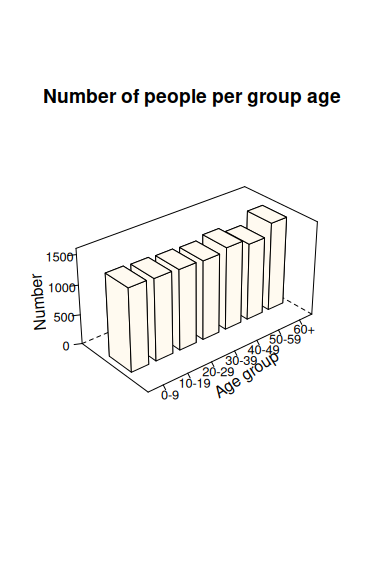
Figure 4.1: A bar chart of the age groups of people in the NHANES study.
4.0.1 Introduction
The third step in the statistical investigation process in the curriculum is analysis (Dunn and Marshman, 2020a). Analysis requires data, which may be acquired to answer a research question (RQ) posed by the teacher, and data either teacher-provided or collected by students. Graphs can be used for informally analysing and understanding data; informal, well-constructed graphs can be powerful and enlightening. The main purpose of a graph is to aid understanding of the data, because the data are the means for answering the RQ. For this reason, the curricula say that students,
…with the aid of an appropriate graphical display (chosen from dot plot, stem plot, bar chart or histogram), [should be able to] describe the distribution of a numerical dataset… (ACMGM029)
and
[should] display categorical data in tables and column graphs (ACMEM045)
In other words, constructing the graph is the means: the goal is understanding and describing the data to help answer the RQ. Consequently, the main focus of teaching graphs in class should be understanding what the graphs reveal about the data, rather than the construction of the graphs. As identified by Pfannkuch (2008), schools may emphasise making graphs (mathematical thinking), rather than interpreting these graphs for the purpose at hand (statistical thinking). Furthermore, the skill of making graphs has largely been deferred to computers, enabling large (and, potentially, more interesting) data sets to be used in schools. The type of graphs that the computer should make remains in the hands of the analyst.
The appropriate graph depends on the type of data (Dunn and Marshman, 2020b), the number of variables, and the reason for creating the graph. This article discusses graphs for univariate data (i.e., one variable of interest); the next article will discuss graphs for comparing data sets and for bivariate data (i.e., to explore the relationship between two variables).
Graphs are generally designed for either continuous numerical data or categorical data. Discrete numerical data, however, may be graphed using either set of graphs depending on the granularity: discrete data with many possible values (such as the number of cars that pass through a certain intersection each day) are often graphed using graphs designed for continuous data; discrete data with very few possible values (such as the number of cars that can be garaged undercover at rental houses) are often considered categorical and graphed using bar charts and similar charts.
For numerical data, graphs show the distribution of the data; that is, what values are taken by the variables, and how often they appear. The curriculum states that, after producing graphs, students should describe the features of this distribution:
…describe the distribution of a numerical dataset in terms of modality (uni or multimodal), shape (symmetric versus positively or negatively skewed), location and spread and outliers, and interpret this information in the context of the data. (ACMGM029)
The curriculum mentions five types of graphs for numerical data: frequency distributions, dot plots, stem-and-leaf plots (or stem plots), bar charts (or bar graphs), and histograms. One type of graph is mentioned for categorical data: bar charts (General Mathematics), also called column charts (Essential Mathematics).
Categorical data or discrete numerical data may be displayed in bar charts where the height of the column (if the bars are vertical) or the length of the rows (if the bars are horizontal) is proportional to the number of observations in the given categories. In this chapter, we will focus on graphs for numerical data.
The different graphs for numerical data have different strengths.
- Stem-and-leaf plots are easily constructed manually, and are most useful for small amounts of data, but only work well when the number of stems is small in comparison with the number of leaves and when not too many significant figures are needed.
- Dot plots work best for small to medium amounts of data, otherwise they become cluttered.
- Histograms work best for medium to large amounts of data.
- With numerical data, bar charts are only used for discrete quantitative data with few possible values (and are mostly used with categorical data).
- Frequency distributions are a useful table used as an intermediary step to creating graphs, especially histograms, and are sometimes the most useful way to present the data.
4.1 Example data sets
In what follows, we will use two small example data sets. The first data set regards the age of Australian Prime Ministers on taking office (List of prime ministers of Australia by age, n.d.): Are prime ministers of similar ages, or do their ages vary substantially?.
The second data set is helpful for understanding the weight of McDonald’s French fries in a large serving (Wetzel 2005; continuous numerical data): Are the serving reaching the target of \(171\) g? How much does the amount vary?.
The data are displayed as frequency distributions in Tables 1 and 2 respectively.
4.2 Frequency distributions
Frequency distributions display the data organised into tables showing the number of observations for each value (or a set of values) of the discrete numerical variable (Table 1), or the number of observations for different ranges of the continuous numerical variable (Table 2). These tables help organise the data, make constructing other graphs much easier (if they are to be constructed by hand), and make some numerical statistics easier to compute. They do, however, hide some detail in the data (for example, two prime ministers were in their \(30\)s, but their exact ages are no longer available).
Table 1: The age of Australian Prime Ministers on taking office.
| Age (in completed years) | Number of prime ministers |
|---|---|
| 30 to 39 | 2 |
| 40 to 49 | 7 |
| 50 to 59 | 18 |
| 60 to 69 | 3 |
Table 1 shows that the ages of prime ministers vary markedly: from their \(30\)s to their \(60\)s. Table 2 shows that servings of large fries also exhibit large amounts of variation, and all but one serving was below the target weight.
The data ranges in frequency distributions should be mutually exclusive: each observation can only ever belong to one range. (For example, in Table 2 ranges such as ‘110 to 120’ and ‘120 to 130’ may be ambiguous, as a value of \(120\) could belong to either.) Continuous data are recorded or rounded to a certain number of significant figures or decimal places (Dunn and Marshman, 2020b), so care should be taken to ensure that the ranges are not defined so that data fall onto boundary values.
The ranges should also be exhaustive, so that no gaps exist between the categories when continuous data are used (Table 2). Ideally, the ranges should be ‘nice’: for instance, ‘110 to under 120’ and ‘120 to under 130’ is easier to understand than ranges like ‘110 to under 118’ and ‘118 to under 126’.
Table 2: The serving weight of large fries at McDonalds in the USA. The target weight is 171 g.
| Weight of fries (in g) | Number of serves |
|---|---|
| 110 to under 120 | 1 |
| 120 to under 130 | 2 |
| 130 to under 140 | 8 |
| 140 to under 150 | 9 |
| 150 to under 160 | 11 |
| 160 to under 170 | 0 |
| 170 to under 180 | 1 |
4.3 Dot plots
Dot plots are useful for small-to-medium sizes data sets. One advantage of dot plots is that each individual observation is visible. However, with too much data, they become hard to read with too many dots. When multiple observations take on the same—or almost the same—value, a decision must be made about how to distinguish the observations. Most commonly, the data are stacked on top of each other (Fig. 4.2), visually creating a graph similar to a histogram.
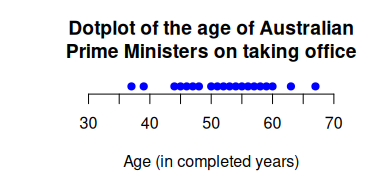
Figure 4.2: The dot plot for the age of Prime Ministers.
Once students have drawn or observed the graph, it is important that they are given opportunities to describe the data in the context of the data, and to discuss how it helps answer the RQ. For example, for the fries data (Fig. 4.3), how well is McDonald’s reaching its target serving size? What is the range of weights for most of the data?
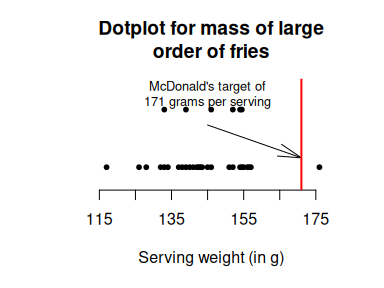
Figure 4.3: The dot plot for the fries data.
4.4 Stem and leaf plots (or stem plots)
Stem-and-leaf plots (or just stem plots) are useful for small amounts of data (Figs. 4.1 and 1(tab:FriesStemplot)), and only work well for certain types of data as explained earlier.
When they are appropriate, stem-and-leaf plots are quick to construct manually, and very informative as each actual value is displayed.
For some data, leaves are difficult to define, such as when little variation is present; for example:
21, 22, 22, 22, 23, 23, 25, 26, 26, 26, 26, 27, 27, 28, 29, 29, 29.
In these cases, stems can be split so that, for example, two stems correspond to values in the twenties (i.e., the first for 20, 21, 22, 23 and 24; the second for 25, 26, 27, 28, 29), or even more stems used.
All stem-and-leaf plots should clarify how the stems and leaves should be interpreted. For the ages of Prime Ministers (Fig. 4), for example, “30 | 7” means “37 years of age”. For instance, the stem-and-leaf plots could also be constructed using the stems as 3, 4, 5, and 6, when the plots would be described as “3 | 7 means 37 years of age”.
| 30 | 7 | 9 | ||||||||||||||||
| 40 | 4 | 5 | 6 | 7 | 7 | 7 | 8 | |||||||||||
| 50 | 0 | 0 | 1 | 2 | 2 | 3 | 3 | 3 | 4 | 5 | 6 | 6 | 6 | 6 | 7 | 8 | 9 | 9 |
| 60 | 0 | 3 | 7 |
| 11 | 7 | ||||||||||
| 12 | 6 | 8 | |||||||||
| 13 | 2 | 3 | 3 | 4 | 7 | 8 | 9 | 9 | |||
| 14 | 0 | 1 | 2 | 3 | 3 | 4 | 5 | 6 | 6 | ||
| 15 | 1 | 2 | 2 | 4 | 4 | 5 | 5 | 5 | 6 | 7 | 7 |
| 16 | |||||||||||
| 17 | 6 |
4.5 Histograms
Histograms work well for medium to large amounts of data. In histograms, the area of each bar is proportional to the number of observations. Most commonly, and especially in schools, bins have equal width; this is equivalent to having the heights of the bars proportional to the number of observations.
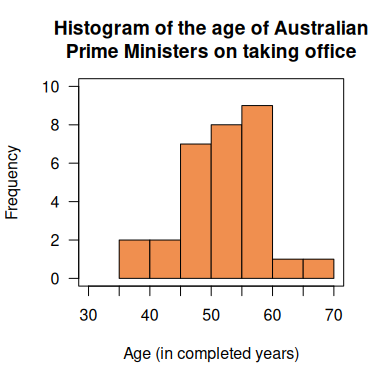
Figure 4.4: A histogram of the age of Prime Ministers.
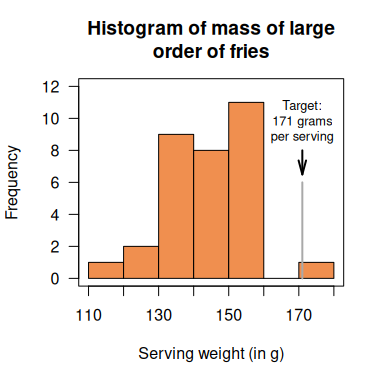
Figure 4.5: A histogram of the serving size of fries.
The stem-and-leaf plots have the appearance of histograms tipped on their sides (compare Figs. 4.4 and 4.5 to the stem plots in Figures 2 and 3), with the advantage that the actual values are still visible. However, histograms allow more flexibility in choosing the width of the histogram bars that stem plots. Software chooses the bins automatically, and sometimes this choice needs to be changed. With too few bins, the histograms show too little detail about the distribution; with too many bins, many histogram bars will have zero (or small) counts, and the graph loses information about the distribution at the expense of showing individual observations. In either case, a sense of the overall distribution is lost (Figure 8) which does not help answer the RQ.
Despite this, no “ideal number of bins exists. Generally,”nice” bins are preferred (such as 110 to under 120; 120 to under 130; etc.) over obscure bins (110 to under 118; 119 to under 127; etc.). While many rules exist for computing the ideal number of bins (such as Sturge’s Rule, where the number of bins is \(\log_2(n) + 1\), where \(n\) is the sample size), none work universally well, and the best approach is probably trial and error (using the bin width that best helps answer the RQ).
As with frequency distributions, bins must be mutually exclusive and exhaustive. One potential point of confusion with histograms when used with continuous data is where to place values on the boundary (Figure 7). Some authors encourage using bin boundaries with one more decimal place than the given data to avoid this issue; however, since the data are rarely available to readers, this may add to confusion. For the fries data, then, the boundaries in Figure 7 would be placed at 109.5, 119.5,129.5, etc. A common convention is for each bar to include data that coincides with the left-side boundary. Since this convention is not universal, checking the approach of the software is recommended.
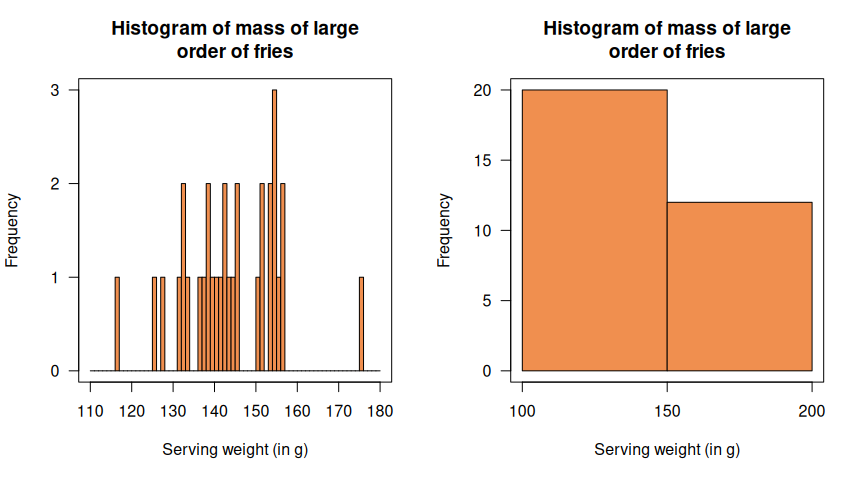
Figure 4.6: The histogram of serving size of fries: Using too many bars (left) and too few (right).
4.6 Describing the graphs
Gattuso & Ottaviani (2011) emphasise that statistics is “data linked to a context” (p. 126). In the context of graphs, this means that graphs should be interpreted to help readers understand the data to help answer the RQ. Numerical data can be described (ACMGM029) using modality (uni or multimodal), shape (symmetric versus positively or negatively skewed), location and spread and outliers. The Guidelines for Assessment and Instruction in Statistics Education (GAISE; Carver et al., 2016) says that graphs should be described in terms of their “shape, center, variability, and unusual observations” (p. 10) to highlight the variability essential in statistics and encouraging the consideration of unusual observations.
The location is the average value; the spread refers to the amount of variation in the data; the shape refers to the profile (distribution shape) of the data, including skewness; and outliers refers to any unusual values. Some of these descriptions can be described numerically by using (for example) the median, mean or standard deviation (to be discussed in a future article in this series).
For the age of Prime Ministers, the dot plot (Figure 2) and the stem plot (Figure 4) help us understand the ages of prime ministers: the graphs show a wide spread of data. Identifying the middle of the data set (e.g., median age) is difficult; however, the stem plot allows easy computation of the median (of 53 years) and range (of 30 years). When the data are grouped the graph is approximately symmetric.
The dot plot for the mass of the large order of fries (Figure 3) again shows well-spread data and clearly indicates that only one order was larger than the target mass: the servings are clearly not very consistent from one order to the next. The stem plot (Figure 5) shows that the data are left skewed, and the modal category of mass of large fries have a mass in the 150s. The median mass of the fries is 143.5g. The histogram for the mass of the fries (Figure7) also indicates skewed data with a modal category of 150 to less than 160. Figure 8 clearly indicates the loss of clarity with using too many bins (left panel) or too few bins (right panel).
4.7 What makes a good graph?
Since graphs are prepared to help readers understand the data, a good graph should be clear to the reader. This includes:
- adding clear and informative labels and titles;
- adding units of measurement;
- labelling levels of a categorical variable;
- removing unnecessary clutter
and so on. For example, in Figures 3 and 7 adding the location of the “target serving size” makes the graph more meaningful. When the frequency or percentage axis (typically the vertical axis) begins from a non-zero origin, this truncation should be clearly indicated on that axis, otherwise the graph can be misleading.
4.8 How to construct graphs
Graphs can be constructed either manually, or by using software. Almost all graphs can now be created easily using software. The questions that teachers need to consider are:
- Pedagogically, what is the best way to make a suitable graph to achieve the learning goals?
- What are the advantages and disadvantages of learning how to draw a graph manually?
The key is what the graph means and reveals about the data; the method of producing the graph is less important.
Advantages of using a computer include:
- fewer errors are made;
- large data sets (which may be real or more interesting) are no harder to use than small data sets and so real data sets are more accessible;
- the ability to construct non-standard graphs; and *( graphs can be saved for later editing (including exploring different bin sizes for histograms).
Using a computer also presents the opportunity to easily change the type of graph so that students can compare, for example, histograms and dot plots, or both 2D and 3D histograms, or the difficulties of reading 3D charts.
Using a computer does have disadvantages, however. Computers allow, and sometimes encourage, users to adorn their graphs with unnecessary elements (“chartjunk”; Su, 2008), such as adding unnecessary third dimensions, using silly fonts, using odd or too many colours, etc. Sometimes incorrect graphs may be encouraged by the software. Default settings sometimes can be difficult to change, and students may be unaware of the unreasonableness of their graph when an error is made. In Microsoft Excel, the default bin labels of the histogram will need to be changed or explained; the labels are written as (for example) [1,3] and (3,5] etc indicating that the first bin is between 1 and 3 but the second bin is indicating from larger than 3 up to and including 5.
Free, online alternatives to using Excel for drawing graphs include iNZight (https://inzight.nz) and Statgraphics stratus (http://www.statgraphicsstratus.com/). These packages, and others, will be discussed in a future article.
4.9 Teaching ideas
Students sometimes misinterpret graphs.
[My softdrink example]
A living histogram or living dot plot is an opportunity for students to understand these graphs by physically making a histogram or dot plot by positioning themselves on an axis. For example, Joiner (1976) had his college class construct a histogram of their heights. This becomes an opportunity for students to collaborate to determine how they will measure and record the heights of the students in their class. They will need to negotiate bin widths and then organise how they will construct their histogram and mark the scale on the axis. It would be expected that if the females and males are combined the histogram will be bimodal, but if students then made separate male and female histograms that there would then be one mode. A link to a photograph of a living histogram is available on the website associated with this series (see below).
Students can easily collect data to create graphs; for example, consider the question “What is the effect of exercise on heart rate?” This question can be answered by asking students to take their heart rate by using two fingers, count the number of heart beats in 10 seconds either at their wrist or neck and multiply by six. Students can then plot this data on a class stem plot.
Poor and misleading graphs are useful for helping students understand some of the challenges with graphing. Students can be provided with poor graphs and asked to explain why they are poor. Students can then sketch an improved version of the graph. Alternately, students could be asked to find misleading graphs in a newspaper or online, and identify why they are misleading and why they may have been drawn that way. Alternate versions of these could also be sketched.
4.10 Resources
A website has been created to support The Data Files articles (https://bookdown.org/pkaldunn/DataFiles). This website contains links to interesting, real datasets (e.g., pizza diameters), free statistical software, and teaching ideas and resources.
Warm-up question answer: The graphs makes it difficult to answer the RQ. The third dimension is unnecessary, and makes the graph harder to read. In addition, the title could be improved; the \(y\)-axis label should be more meaningful. The colours imply that some meaning is attached to them, but this is not explained. A better graph might look like that in Fig. 4.7.
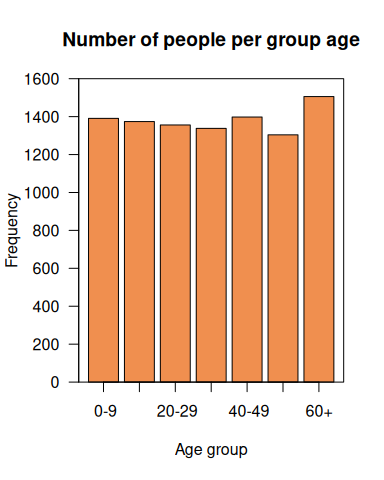
Figure 4.7: An improved bar chart of the age groups of people in the NHANES study.